login | register
Sun 20 of Jul, 2008 [07:46 UTC]

voip-info.org

History

AG-168V

Created by: petersun,Last modification on Tue 13 of Jun, 2006 [02:43 UTC] by sxj

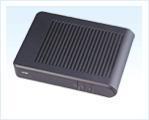
Atcom AG-168V

Image
big photo:

Hardware Specifications:

Support H323 V4 ,MGCP, SIP ,IAX2 and Net2Phone
DHCP support for LAN or Cable modem
PPPOE support for ADSL or Cable modem
Set phone by HTTP web browser(IE6.0) or Telnet
Upgrade by FTP
Support G.711 a/u ,G.723.1 5.3/6.3, G.729A/B/AB/ gsm610
Dynamic voice test
CNG(Comfort noise generation)
G.168/165 compliant 16ms echo cancellation
Tone generation and local DTMF re-generation according with ITU-T
E.164 dial plan and customized dial rules

Voltage: DC 12V^24V
Power adapter: DC 12V/450mA (220v)
Network interface:1 RJ-45 Ethernet connectors
Telephone Interface: 2 RJ-11
- One "Tel" FXS Interface
- One "Line" PSTN Pass Through

Size:

150 × 110 × 28 mm (L × W × H)

Contact :


ATCOM technology co.,limited
Address Rm.6A/B,Shangtian building,No.70,Nanyuan Rd., Shenzhen,China
Tel (86)+755-83018469 83018569 83018769
Fax (86)+755-83018319
http://www.atcom.cn
E-mail sales@atcom.com.cn


See also:


Comments

Comments Filter
222

333New (May/2007) Firmware download address

by poli, Saturday 05 of May, 2007 [22:49:15 UTC]
The new address for firmware downloading for the PA168X-based phones is http://www.aredfox.com/PA1688/edownloads.htm
222

333New (May/2007) Firmware download address

by poli, Saturday 05 of May, 2007 [22:47:22 UTC]
The firmware download address for the PA168X-based devices has changed to http://www.aredfox.com/PA1688/edownloads.htm
222

333Settings for Voipbuster, outbound & inbound

by BartK, Sunday 22 of January, 2006 [14:12:16 UTC]
After some weeks of trying, I've got both outbound and inbound calls with Voipbuster using this device.

It turned out that for inbound calls to work, NAT Traversal has to be set to 'enable' instead of 'STUN'.

My ATA is hooked to a Linksys WRT54G router, which is in turn hooked to a Speedtouch ADSL modem. The beauty is that *no* special settings are required for the router or modem (no DMZ, no custom port forwarding ranges etc).

I would like to thank all people who reacted to my previous postings about the Atcom config and tried to help me! I hope I can help other people by posting this topic.

Here is a screenshot of my settings. The firmware used is SIP V1.49.002
http://www.xs4all.nl/~galaxie/voip/voipbuster_atcom168.gif

222

333Re: Re: Works great with SIP and IAX2!

by michael301080, Tuesday 13 of September, 2005 [05:43:45 UTC]
Hi,

Look at the same product on this website: http://www.upnet.lt/home/ag-168
The technical specs show you need a 12V DC adaptor that can deliver 450mA.

HTH,

Michael Van Wesenbeeck
222

333Re: Works great with SIP and IAX2!

by tafilaj, Wednesday 20 of April, 2005 [16:19:11 UTC]
I have the AG-168 but i have a USA power adaptor.
I'm in UK so i need a 220v-240v adaptor.
the 110v adapter that i have it has autput of 9V 640ma.

all teh info i can see here it tells me diferent,
i pluged a 9 v adapter but it will not work.

can you do me a favur
and confirm the output voltage ouf your adapter pls.

thanx
222

333Works great with SIP and IAX2!

by mole, Friday 15 of April, 2005 [19:31:40 UTC]
Just received one of these from Digital Media Experts (http://www.digmedexp.com) for USD 59. The device comes without manual, but this can be retrieved from their site or http://www.aredfox.com. To get IAX2, you need to download the appropriate firmware here.

Apparently, there are 2 types of this box: The AG-168 and the AG-168V. Eventhough mine is LABELLED AG-168, it is actually the V model. You can check this by looking at the number of RJ-11 ports:
1 port = AG-168, needs firmware PA168Q
2 port = AG-168V, needs firmware PA168V

Find a forum regarding this device at: http://bbs.pa1688.com/