login | register
Sat 30 of Aug, 2008 [01:23 UTC]

voip-info.org

Discuss [14] History

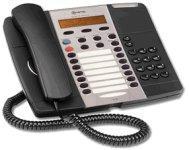
Asterisk phone Mitel 5220

Created by: flavour,Last modification on Mon 14 of May, 2007 [22:05 UTC] by linker3000

Mitel 5220 / 5215 phones in SIP mode - General notes


Image


The Mitel 5220 Phone is a full-featured, standards-based business telephone.

The original 5220 only supported Mitel's Proprietary MiNet protocol, but the later Dual Mode versions can be switched into SIP mode. The 5215 model is a cut-down version of the 5220 with fewer programmable buttons and a reduced set of address book features, but fundamentally they are the same phone and these notes apply to both models. For the sake of clarity, references to '5220' also refer to the 5215 model unless specifically mentioned otherwise.

Documentation

Documentation is found at Mitel's documentation site at http://edocs.mitel.com/UG/EN/En_list_UG.html#5215_5220anchor. The current versions of the documentation (at the time of this writing) are:

Changing the Phone into SIP Mode

The phones ship by default configured to use Mitel's MiNet protocol. To change a set to use SIP, follow the steps below.

NOTE: These instructions apply to the 'Dual Mode' phones. Some older units are not Dual Mode and therefore cannot be switched into SIP mode. To check, look at the label on the base of the phone and make sure the description includes the words 'Dual Mode'. If not, your phone does not support SIP. Neither can such phones be upgraded with SIP firmware.

  1. Disconnect the power from the set.
  2. Hold down the "Superkey" (or "Menu" key with some paper inserts) while powering up the set.
  3. The set will come up and ask if you want to CONFIGURE PHONE? select YES.
  4. "NETWORK PARAMETERS?" select NO
  5. "HARDWARE CONFIG?" select NO
  6. "PHONE MODE?" select YES
  7. "PROTOCOL?" select YES
  8. "PHONE MODE: Minet" select Change
  9. Select "SIP", "Accept" and confirm with "Yes". It will now save the settings to NVram
  10. "REBOOT NOW?" select Yes

The set will now boot into SIP mode and you can proceed with phone configuration.

Note: Occasionally, some phones end up in a reboot loop after being switched to SIP mode - it seems that the SIP firmware is either corrupt or somehow does not get enabled properly. If this happens, you need to re-install the SIP firmware. Instructions on how to do this are hereabouts, but you need to get into the phone to set up the address of your TFTP server and to turn on automatic updates; to do this, power up the phone with the volume-up arrow key held down and you will find you can make the necessary changes.

Phone Configuration

You first need to connect to the web administration interface on the phone:
  • On the phone, press the Superkey (or Menu with some inserts) key and then the first line key. The display will now show you the IP address of your set.
  • On your PC, point your web browser(:exclaim:) to that IP address.
  • The default user name is "admin" and password is "5220" (or "5215" for that model).
Note: The web management feature uses some peculiar scripting that works only with IE. Changes fail without warning when using Firefox, Konqueror or Opera, so on Linux you're out of luck.


See also:


Comments

Comments Filter
222

333Switching extensions

by wormser, Wednesday 07 of November, 2007 [22:56:13 UTC]
I had a phone break and want to replace it with a backup phone. I want to change the backup phone to quick using its current extension and use the extension of the phone it is replacing. Is there a simple way to do this on the phone? For some reason I can't find anything about setting up phones in any manuals.

Thanks,
- Danny
222

333Switching extensions

by wormser, Wednesday 07 of November, 2007 [22:51:43 UTC]
I had a phone break and want to replace it with a backup phone. I want to change the backup phone to quick using its current extension and use the extension of the phone it is replacing. Is there a simple way to do this on the phone? For some reason I can't find anything about setting up phones in any manuals.

Thanks,
- Danny
222

333Savign Settings Problem

by trig45, Saturday 14 of July, 2007 [12:46:22 UTC]
Hi All,

When it try to save and reboot, the sip proxy server does not save, but if i put it in and just save, the phone works fine.

Any ideas appreciated.

222

333

by erikbagley, Thursday 19 of April, 2007 [20:17:31 UTC]
I'm having problems even being able to get into my 5220. I am unable to verify that the mode is running in SIP mode as all the info I've read doesn't seem to work on my phone. When powering it on, I hold the "Superkey" and I don't get the same prompts that I see listed below. I get a menu asking for static input information which ends in a ping test that locks up the phone. I'm wondering if the phone is running an out of date firmware or a firmware that has become corrupted. The phone will never boot all the way, so I am unable to try to get it to pick up the new firmware. Any ideas?
222

333

by tbelangerjr, Friday 15 of December, 2006 [20:00:23 UTC]
I'm having a problem where switching to SIP mode locks the phone up and renders it unuseable:

I switch the phone to SIP mode
Phone reboots and pulls a DHCP address
I then browse to the phone and setup the SIP user account and server settings via the above documentation.
I click save and reboot
Phone shuts down
When the phone comes back on, All lights stay lit, and nothing else happens
Only thing you can do from that point is call and have the phone replaced??


222

333Re: Mitel 5235

by jpmendez, Friday 01 of September, 2006 [00:47:06 UTC]
Hi Pat, im trying the 5235, but when i boot it in SIP Mode it tries to download something about SIP...but it failed SIP downloading...and it restarts...
so i never get into the phone. I dont have a 3300 here so Minet will not work too...

any ideas about starting the phone in SIP? it seems like it dont have like a SIP upgrade or samething....
222

333Firefox + 5215

by leemason, Tuesday 21 of February, 2006 [16:40:46 UTC]
I have read that these phones can onyl be configured using MSIE. However, I am using Firefox 1.5 under Mandriva LInux and I can configure mine with no problems. Set it up to use sipdiscount.com and outgoing dialing works fine. The dial plan setup is quite good as sipdiscount requires the full international dial prefix to be used whereas most humans don't dial this so set the dial plan so that people can just do national dialing and the dial plan removed the leading 0 and replaces it with 0044 for UK numbers. Sound quality is pretty good as well. I have used Grandstream, Sipura, Aastra, and Mitel and the best two of these are Aastra and Mitel.

Lee.

222

333Mitel 5235

by pjhealy, Tuesday 22 of November, 2005 [16:16:08 UTC]
Hi,

Just a FYI; I followed these instructions for the new 5235. They not only mactch as far as the web setup screens go, but the sample sip.conf worked great. The trick I had for the phone setup stemmed from the fact we also run Mitel's ICP 3300 here as well. If you let the phone use DHCP as its boot process, the phone will attempt to configure itself off the 3300. I hard coded the IP address, changed the tftp server to the Asterisk machine and that seemed to do the trick!

Pat
222

333Mitel 5235

by pjhealy, Tuesday 22 of November, 2005 [16:15:41 UTC]
Hi,

Just a FYI; I followed these instructions for the new 5235. They not only mactch as far as the web setup screens go, but the sample sip.conf worked great. The trick I had for the phone setup stemmed from the fact we also run Mitel's ICP 3300 here as well. If you let the phone use DHCP as its boot process, the phone will attempt to configure itself off the 3300. I hard coded the IP address, changed the tftp server to the Asterisk machine and that seemed to do the trick!

Pat
222

333Jason in the UK

by jasonuk, Saturday 24 of September, 2005 [16:08:16 UTC]
Hi guys! I have one of these phones but it doesn't have the SIP firmware - pre dual-mode MiNet only one. Following the instructions - holding down Superkey whilst powering up just enters a manual IP config with ping test at the end that just stops with that. When you try to access the phone via web configuration it doesn't respond. I assume the old firmware didn't even have a web config! I even set up a TFTP server but the phone is looking for ipp510bootEnc.bin, ipp510boot.bin and upp510main.bin - none of the files on the SIP Firmware updates.

Any ideas before I go raving mad? :-)


Jas