


The GXW series offers the small enterprise, SOHO, remote offices and multi-location enterprises a cost-effective, easy to deploy VoIP FXS analog gateway.
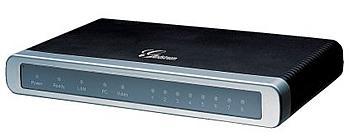
Designed and tested for full interoperability with leading IP-PBXs, Softswitches and most SIP-based environments, the GXW technology ensures manageability, a simple configuration, and superb voice quality. GXW Series IP Gateway is based on open industry standards.
- 8 FXS analog port gateways
- Two RJ-45 ports (switched or routed)
- TFTP and HTTP firmware upgrade support
- Supports Audio Codecs: G711, G723, G729 and GSM
- T.38 compliant
- Web management for easy configuration and installation
Interfaces
- Telephone Interfaces
- 8 RJ11 FXS ports
- Network Interfaces
- 10M/100Mbps
- Dual RJ45 ports
- Admin Console Interface
- RS232 Serial Port
- LED Indicators
- Power
- Network
- Line LEDs
Voice, Fax, Modem
- Voice Over Packet Capabilities
- G.168 complaing Echo Cancellation
- Dynamic Jitter Buffer
- Modem detection
- Auto-switch to G.711
- PSTN Fail-over Life Line
- PSTN Failover on power failure
- Voice Compression
- G.711
- G.723
- G.726 (40/32/24/16)
- G.729A/B/E
- G.728
- iiBC
- DHCP Client Server
- Nat Router or Switched Mode
- Fax over IP
- T.38 complaint Group 3 Fax Relay up to 14.4kpbs
- Auto-switch to G.711 for Fax Pass-through (pending)
- QoS
- Diffserve
- TOS
- 802.1P/Q VLAN tagging
- IP Transport
- RTP
- RTCP
Signaling
- DTMF Method
- Felxible DTMF transmission method
- User Interface of in-audio
- RFC2833
- SIP Info
- IP Signaling
- SIP (RFC 3261)
- Multiple SIP server profiles and accounts per box
- Up to 2 distinct SIP server profiles per system
- Independent SIP account per port
- Provisioning
- TFTP
- HTTP
- HTTPS (pending)
Security
- Media
- SRTP not available
- Control
- TLS/SIPS
- Management
- Syslog supprt
- HTTPS
- Telnet
- Remote Management using Web Browser
Physical
- Power
- Output: 12VDC
- Input: 100-240 VAC/ 50-60Hz
- Environmental
- Operational: 32-104 Farenheit or 0-40 Celsius
- Storage: 14-140 Farenheit or -10-60 Celsius
- Humidity: 10-90% Non-condensing
- Dimensions
- 230mm x 135mm x 35mm
- Mounting
- Wall mount & desktop
Additional Features
- Short and long haul
- REN3: uP TO 150FT ON 24 AWG LINE
- Caller ID
- Bellcore Type 1 & 2
- ETSI
- BT
- NTT
- DTMF-based CID
- Polarity Reversal /Wink
- Yes
Homologation
- EMC
- EN55022/EB55024
- FCC part15 Class B
- Safety
- UL
Ships With
- GXW 4008Analog IP Gateway
- Ethernet cable
- 12V universal power adapter
voxilla.com Grandstream Users Group discussion forum
Known Issues
- It always queries the provisioning configuration file using the MAC address associated to the LAN interface even when only the WAN interface is plugged to the network;
- it is not possible to use a sub path when using provisioning via UDP, you can only specify an IP address or an host name;
- Generation of DTMF on FXS port (RFC2833) is either not done or incorrect (very short tone, and rapid dtmf events cause wrong dtmf sequence). When using with a phone this is not a problem, but when using to feed an analog PBX that has an IVR it causes failures.
Configuration Tips
- DHCP Server on the LAN port can be enabled/disabled with option P5001 (# Enable LAN DHCP. 0 – No, 1 – Yes)
- To see all config fields without the template, log into the web gui and view the HTML page source (CTRL-U in Firefox)
- When naming config files for provisioning, use the MAC address printed on the label on the bottom of the device (same as the one on the box)
- Serial settings for console port: 115,200bps, 8,N,1, flow control off


 April 7, 2023
 Phone System