


Siemens Gigaset S675 & S685IP
Summary
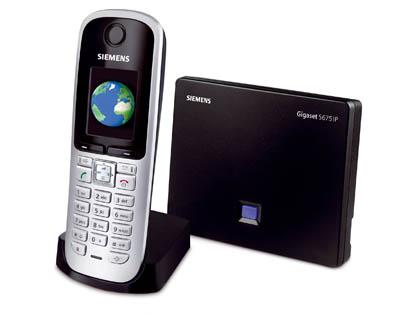
A VoIP DECT Phone based on the Siemens Chagall Platform. The Siemens Gigaset S675IP/S685IP is a successor to the Siemens Gigaset S450IP. It adds the following features:
Page Contents
- Firmware Update 12/2010 Version V02227:
- Beta Firmware Update (unknown date) Version V02226:
- Beta Firmware Update (unknown date) Version V02225 (N/A):
- Beta Firmware Update (unknown date) Version V02224 (N/A):
- Firmware Update 12/2009 Version V02223:
- Firmware Update 11/2009 Version V02214:
- Firmware Update 07/2009 Version V02191:
- New phone book sync software for Macintosh available (June 2009)
- Official NEW Firmware version V184 (NEWS : Available April 08, 2009)
- Official NEW Firmware version V140 (was available January 17, 2009)
- Official NEW Firmware version V139 (was available from November 25th 2008)
- Obsolete (not official) pre-release
- Unofficial pre-releases
- Official Firmware versions
- RSS Feeds and Info display
- Known problems
- Integrated answering machine
- Improved handset with a larger display (S67H for the S675IP, S68H with bluetooth support for the S685IP)
- Screen saver displaying RSS feeds and other information sources
- No direct SIP URI dialing (or SIP URI address book entries); IP dialing might be possible though (Aug 2009)
(Dialling of landline numbers which are associated to a SIP account results in VOIP calls on said SIP account)
Firmware Update 12/2010 Version V02227:
http://gigaset.com/chagall/2/chagall227_02.bin
Improvements:
– New URL for profile and firmware update: http://profile.gigaset.net/chagall/…
– PSTN: correct behavior for calls using access code with 2 or 3 digits
– VoIP: account specific MWI notification
– VoIP: improved early media support for outgoing wideband calls (handling of ALERTING)
– Fix for internal call from a wideband handset to a narrowband handset
– Display correct date for the last three days of the year.
– Web Configurator (Settings/Telephony/Audio): The Codec list for Gigaset.net is also displayed if no other VoIP accounts are configured.
– Web Configurator (Status/Device): MAC identifier for auto-configuration is shown additionally to MAC address.
– PBX Interoperability: Trixbox Pro – fix for incoming calls
– Australia: correct Daylight Saving Time is used.
Provider relevant:
– Vox Telecom: Fix for “warble”-sound during a call when using G.722 Codec.
– Vox Telecom: New, correct Vox Telecom Logo.
– Vox Telecom: Re-registration at provider behind Netgear router and using random port configuration is improved.
– SpeakUp: improvement for outbound calls from VoIP to PSTN.
Beta Firmware Update (unknown date) Version V02226:
http://gigaset.com/chagall/provider/general/chagall226_02.bin
New features:
Unknown
Improvements:
unknown
Beta Firmware Update (unknown date) Version V02225 (N/A):
http://gigaset.com/chagall/provider/general/chagall225_02.bin
New features:
Unknown
Improvements:
unknown
Beta Firmware Update (unknown date) Version V02224 (N/A):
http://gigaset.com/chagall/provider/general/chagall224_02.bin
New features:
Unknown
Improvements:
unknown
Firmware Update 12/2009 Version V02223:
http://gigaset.com/chagall/provider/general/chagall223_02.bin
New features:
– Web Configurator (Settings/Telephony/Advanced Settings/Call Transfer): attended and unattended call transfer implemented.
– Web Configurator (Settings/Telephony/Audio): configurable codec list for Gigaset.net implemented.
– Auto-configuration using the MAC address for retail variants implemented.
Improvements:
– Behaviour after resuming a call established by Click2Dial (with BroadWorks Call Manager) is improved.
– Instability issue generated during G.722 CODEC negotiation, when a SIP 183 Session Progress Message is received, is fixed.
– “Registration of more than 5 SIP accounts” issue is fixed.
– “MWI key is permanently flashing” issue is fixed.
– “MWI notification for incoming SMS via IP” issue is fixed.*
– Improvement for Gigaset auto-configuration using TLS encryption.*/**
– PSTN: Local Area Code will be added to the dialled number if the usage of Area Codes is enabled in the appropriate dialling rule.
– Switzerland: Set [tel.search.ch] as default provider for the online directory.
– Russia: Improvements for calls with Russian Caller ID.
- provider-dependent
- device-dependent
Firmware Update 11/2009 Version V02214:
New features:
VoIP: Call transfer also possible for incoming calls.*
VoIP: Performs audio codec negotiation up- and downwards during a call.
VoIP: Acoustic signalling of received out-of-band DTMF-tones during a call.
Web Configurator: new languages – Spanish and Brazilian Portuguese. English is preinstalled. The rest of the available languages will be downloaded when they are selected.
Web Configurator (Settings/Telephony/Number Assignment): Enhanced Auto-Fallback implemented. If the call via IP fails, the phone will automatically dial via next active IP account, trying all IP accounts one by one.
Web Configurator (Settings/Telephony/Number Assignment): Support of a web-based “Call Manager” for incoming and outgoing calls. Works under the premise: IP provider runs a BroadSoft-system.*
Web Configurator (Settings/TelephonyAdvanced Settings): Auto DTMF negotiation implemented.
Web Configurator (Settings/Security): Transport Layer Security (TLS) for Gigaset auto-configuration and TR-069 implemented.*/**
Switzerland: Free VoIP calls between Gigaset IP phones via Phonet.ch. If the entry Phonet.ch is not in the directory, the handset has to be re-registered at the base station.
Provider relevant features:
– SIP over TCP: The prefered transport protocol (UDP/TCP) can be set via the provider profile.
– Period for the automatic check of provider settings is configurable via the provider profile.
– Web Configurator (Settings/IP Configuration): VLAN-Tagging for virtual networks implemented.*/**
– TR-069: Support of Auto-Configuration Server (ACS): Alcatel/Lucent and Gigaset Software Suite.
– Interoperability with softswitches: Asterisk (V 1.4.18), Broadsoft (R14SP5), IP Centrex, Sylantro AS (V4.1.1), Nortel CS2K.
Improvements:
Enhanced reliability of Gigaset.net service through implementation of a RTP-Proxy.
Web Configurator: Support of Internet Explorer 8.0 and Mozilla Firefox 3.5 (with MS Vista) improved.
Telephonebook down-/upload via Web Configurator: vCards are now uploaded correctly.
Improved behaviour during conference calls.*
Automatic check for firmware and provider profile updates improved.
SMS via IP: reception of linked SMS improved.*
CLIP for Brazil, Russia, Netherlands, Great Britain: error correction.
Correction of Russian display texts.
Provider relevant features:
– Handling of audio codec G729 improved.
– VoIP: support of “0+<Number>” format for incoming calls (CLIP).*
Known Bugs:
Web Configurator (Settings/Services): incorrect provider names in the online-directory list. The functionality is not affected by that.
V02214 » correct
AT – Norway » AT – Herold
CH – Panama » CH – [tel.search.ch]
DE – Mexico » DE – klickTel
DK – New Zealand » DK – De Gule Sider
NL – Morocco » NL – De Telefoongids
NO – Netherlands » NO – Gule Sider
- provider-dependent
- device-dependent
Firmware Update 07/2009 Version V02191:
New features:
– Access online information via your handset (go to menu “Info Center”*) such as:
– News: Stay informed with current RSS news feeds.
– Weather: Find out the weather in up to 250,000 locations around the globe.
– My eBay: Monitor the items of your personal eBay account.
– Encyclopedia: Get quick access to Wikipedia.
– Translator: Look up instant translations.
– Unit Converter: Convert a required amount.
– Horoscope: Access your zodiac sign report.
– Biorhythm: Monitor the state of your biological cycles.
– My Applications: Add info services you developed yourself.
– The phone’s connection assistant first asks for an auto-configuration code. If your IP provider supports “automatic configuration”, you will receive the auto-configuration code from your provider. This code enables the automatic configuration of your VoIP account.
Improvements:
– Web Configurator: Support of Internet Explorer 8.0 und Firefox improved.
– Infoscreensaver: German umlauts are now displayed correctly.
– DNS Name for AVM SIP registrar (“fritz.box”) will be resolved from now on.
– The preconfigured area code is no longer dialled for VoIP network mailbox and fixed line calls.
– Incoming VoIP calls stored in the AM list are no longer stored in the missed calls list.
- with S68H, S67H, SL78H, SL37H, C59H, C47H, S45 handsets
http://gigaset.com/shc/0,1935,uk_en_0_34891_rArNrNrNrN_prodId%3A152411,00.html
New phone book sync software for Macintosh available (June 2009)
With this software, you can easily synchronize your contacts on your Macintosh with your Gigaset handset via Bluetooth®.
For Mac OS X 10.4.9 and higher
Features:
Synchronisation of Contacts
Download of screensavers and Picture CLIPs
Download of ringertones*
Gigaset QuickSync Software is compatible with:
Gigaset SL785, SL780, SL78H, SL565, SL560, SL56, SL375, SL370, SL37H, S685, S680, SX685 isdn, SX680 isdn, S685 IP and S68H
- Only with Gigaset SL785, SL780 and SL78H
Download link can be found on:
http://gigaset.com/shc/0,1935,hq_en_0_171451_rArNrNrNrN_parent%253A171447,00.html
Official NEW Firmware version V184 (NEWS : Available April 08, 2009)
Firmware Update 04/2009 Version V02184:
Full version number from web interface:
Firmware version: 021840000000 / 043.00
EEPROM version: 125
New features:
E-mail viewer (with C47H, S45, S67H, S68H handsets)
Mute function. Turn off the handset’s microphone during an external call with the left display key.
Send and receive SMS messages via VoIP*
VoIP: If the telephone cannot establish a VoIP connection, it automatically dials via the fixed line network (auto-fallback to PSTN).
VoIP: Call transfer via R key
VoIP: An incoming call indicated in parallel at different VoIP devices (parallel ringing) will not be stored in the “Missed calls” list if the call was accepted at one of the devices.*
Online directory: display the postal codes in search results.*
Online directory: when starting a new search the cities used in the last searches will be displayed.
Fixed line access codes can be stored in the phone.
Some languages will be loaded on to the base via the internet, depending on the language set on the handset.
Extended RTP port range (1024-55000)
DHCP Option 114 implemented.*
DHCP Option 120 implemented.*
Web Configurator: option to specify whether the “area code” is dialled as well.
Web Configurator: display RTP port range
Web Configurator: new languages – Arabic and Russian
Web Configurator: enhanced PIN protection – warning if the default pin (0000) has not been changed.
Improvements:
The automatic search function for firmware updates is enabled even if the internet connection is temporarily interrupted during the night.
The indication “Anonymous call activated” will no longer be displayed in the idle mode of the handset.
The country code is synchronised between base station and handset.
- provider-dependent
Official NEW Firmware version V140 (was available January 17, 2009)
Firmware Update 01/2009 Version V02140:
(After FW update country settings for automatic time settings are back to defaults. Telephony/Advanced settings are affected as well. )
Full version number from web interface:
Firmware version: 021400000000 / 043.00
EEPROM version: 125
Improvements:
===============
– Name replacement from online directory caused an error, for very long names.
Official NEW Firmware version V139 (was available from November 25th 2008)
An new official firmware version was announced for the end of october, and is released per 25 oktober 2008.
Gigaset C470 IP / C475 IP / S675 IP / S685 IP Firmware update 11/2008
Download version: 02139
New Features:
- Online directory for Switzerland provided by [tel.search.ch]
- HTTP Proxy support. For example online directory can be used in company environments via an HTTP proxy server.
Improvements:
- Fast media switching improved (due to partial loss of provider cost rate announcements, e.g. at Sipgate)
- Indication of VoIP waiting calls improved
- Firmware update procedure starts before VoIP connection assistant.
- Store the complete caller information in the “Missed Calls” list, if it is retrieved from online directory
- Optimised presentation of search results in Yellow Pages (on C47H, S67H, S68H handsets)
- Gigaset.net assistant starts if the user opens Gigaset.net directory for the first time and there is no corresponding Gigaset.net nickname.
It does no longer start after the VoIP connection assistant.
- The phone deregisters from registrar server, once the SIP account is disabled.
- Wideband support for A58H/C38H handsets improved
- SMS wizard disabled (subscription to SMS service is no longer necessary)
- Handling of IP dialling improved
- Automatic user login by accessing the Gigaset.net configuration page via Web configurator
- Handling of multiple network mailboxes improved
- Translation errors fixed
- Support of new daylight saving time rule for New Zealand
- Sipgate echo test supported again (handling of RTP sequence numbers)
Obsolete (not official) pre-release
2008-10-22 Version V02133: 021330000000 / 041.00 EEPROM version: 124
To acces this pre-release goto: gigaset.siemens.com/chagall/T_HJL/chagall133_02.bin
(URL doesn’t work : 404) Siemens has been removed this beta firmware which apparently was the only way to fix their “missing calls” bug!
Download location is in below section, there should be no copyright problems as the firmware contains GPL open source software.
New Features:
- Not yet known, no release notes enclosed
Improvements:
- Not confirmed yet, no release notes enclosed BUT per reports this fixes the critical “missing calls” bug whereby the phone just drops registrations and ignores incoming calls.
UPDATE: From a source that would like to not be named: http://drop.io/chagall133_02
This is Siemens Gigaset S675IP – Pre-release Firmware 2008-10-22 Version V02133: 021330000000 / 041.00 EEPROM version: 124
Good luck guys! I have not been able to test it myself.
Unofficial pre-releases
2008-10-15 Version V02131: 021310000000 / 041.00 EEPROM version: 124
To acces this pre-release goto: gigaset.siemens.com/chagall/T_HJL/chagall131_02.bin
2008-10-09 Version V02129: 021290000000 / 041.00 EEPROM version: 124
To acces this pre-release goto: gigaset.siemens.com/chagall/T_HJL/chagall129_02.bin
New Features:
- Not yet known, no release notes enclosed
Improvements:
- Not confirmed yet, no release notes enclosed
Official Firmware versions
2008-11-25 Version V02139: 021390000000 / 043.00 EEPROM version: 125 (043 could be country specific)
New Features:
- Online directory for Switzerland provided by [tel.search.ch]
- HTTP Proxy support. For example online directory can be used in company environments via an HTTP proxy server.
Unofficial Improvement:
- “Missing calls” bug solved
Improvements:
- Fast media switching improved (due to partial loss of provider cost rate announcements, e.g. at Sipgate)
- Indication of VoIP waiting calls improved
- Firmware update procedure starts before VoIP connection assistant.
- Store the complete caller information in the “Missed Calls” list, if it is retrieved from online directory
- Optimised presentation of search results in Yellow Pages (on C47H, S67H, S68H handsets)
- Gigaset.net assistant starts if the user opens Gigaset.net directory for the first time and there is no corresponding Gigaset.net nickname. It does no longer start after the VoIP connection assistant.
- The phone deregisters from registrar server, once the SIP account is disabled.
- Wideband support for A58H/C38H handsets improved
- SMS wizard disabled (subscription to SMS service is no longer necessary)
- Handling of IP dialling improved
- Automatic user login by accessing the Gigaset.net configuration page via Web configurator
- Handling of multiple network mailboxes improved
- Translation errors fixed
- Support of new daylight saving time rule for New Zealand
- Sipgate echo test supported again (handling of RTP sequence numbers)
2008-07-19 Version V02123: 021230000000 / 041.00 EEPROM version: 121
New Features:
- Compatibility with A58H and C38H Handsets (including Infoscreensaver as Liveticker)
- New languages: Brazilian Portuguese, Russian (country and handset dependent)
- BEL, NLD: Autoconfigurationcode-enquiry added in the Handset’s connection assistant
Improvements:
- NAT Traversal improved
- STUN can be disabled for Gigaset.net
- Email-Notification: display of date and subject improved, lenght of Email address up to 74 characters
- Display IP-Address without leading “0”s during the paging call
- Entries out of the calls list will be fully copied into the telephone directory, if the name was displayed from online phonebook.
- Web configurator: does not show “********” for empty password
- SMS Status Report function improved
- SIP Protocol implementation improved
- Incorrect recall after a successful call transfer fixed
- Display Scandinavian characters
- Answering machine functionality improved
2007-12-13: Version V02097: 020970000000 / 041.00; EEPROM version: 114
New Features:
- ECO-DECT is supported
- Net AM calls will be displayed at the handset
- It is possible to select international online phonebook provider
- Advanced Online phonebook features usable (Depends on Provider)
- The number of incoming calls will be replaced by the caller’s name of the online phonebook (Depends on provider)
- The SIP account can be activated with a code (Depends on provider)
- Calling Line Identity Restriction (CLIR) for VoIP (Depends on Provider)
- Directory entries for Gigaset.net and Net Directories will be transferred during registration (Handset: C45, S45, SL55, SL56, C47H, SL37H, S67H)
- Gigaset.net call forwarding
- Default Line configuration via Web Configurator
- Handset name configuration via Web Configurator
- Display of called number (like COLP in ISDN)
- With an active online connection the Web Configurator can be reached with “www.Gigaset-config.com”
Improvements:
- SIP UDP registration improved
- It is possible to edit international Prefix and Local Area Code
- It is possible to use “, ‘, >, <, & in Gigaset.net Nicknames
- Unfounded Stun Requests avoided
- NTP requests minimized
- Wideband (G.722) function improved
- E-Mail and Messenger function improved
- Suffix dialing and dialing plan function improved
- Echo suppression for VoIP improved
- Online phonebook function improved
- Directory transfer to the Gigaset SL1 handset is possible
- IP dialing improved
- Notepad *.vcf files can be transmitted to the handset
- Info Screen problem with Gigaset C47H Handset fixed.
- It is possible to use quotations in the “Display Name” of the SIP profile
RSS Feeds and Info display
The RSS feed to be displayed is configured through the web site. The data will be fetched by the gigaset.net server, and delivered to your phone. The server will check for updates every 30 minutes. The phone will only display the contents of the ‘title’ tag of the first ‘entry’.
It is possible to intercept the info display pages and feed custom data to it if you can redirect “info.gigaset.net” somehow, i.e. by running your own name server. Instructions for this are available here.
Known problems
- First 1.0 – 1.5s of conversation is cut off (you are not hearing your counterparty when calling out)
- “Call answered elsewhere” reason code in aborted calls is ignored
- Crash on startup (thus causing reboot loop) when using multiple network voicemail with Asterisk (at least with 1.6.0).
- Only two SIP invites are processed in parallel, making it impossible to use individual SIP accounts per handset and calling more than 2 with a call distribution. Use an additional “call multiple handsets” SIP account as a workaround if you have less than 6 handsets.
- No G.722 (HDSP) when using a DECT repeater
- No support for MWI on VoIP channels, see comments. fixed
- If the sip.conf section for the S675 IP contains a ‘voicemail=<mailbox>’ statement, asterisk will complain about ‘415 Unsupported Media Type’ each time asterisk tries to tell the phone about the voicemail status. As PieterB pointed out, asterisk actually ignores the list of accepted applications sent by the phone. fixed
- The RSS feed only displays the title of the first entry in the feed, and it does not seem to accept all common feeds.
- Menu 8-5-1 (Call List Type: Missed calls/All calls) is missing. (Does not apply to FW 2123)
- Workaround: To activate “All calls”, press Menu (right arrow), enter 8 5 then 910, display shows: 910 SET (0), enter 1, press OK to activate.
- CRITICAL BUG with latest firmware, you will loose calls ! (Does not apply to FW 2123)
- After a short period of time (1 to 5 days), handsets are no more ringing on all calls, you need to reboot DECT base.(Does not apply to FW 2123)
- A ticket is open with Siemens Support for this problem.
- look at discussion tab
- Possible software crash with low MTU values. TCP-Stack does not react cleanly to PMTU-Discovery.
- In a VPN environment, the MTU of a link may be set to a very low value to allow safe coexistence of VoIP and data applications (i.e. MTU < 576).
- All HTTP traffic is using IP packets with DF bit set.
- When accessing the gigaset.net HTTP services the phone may receive ICMP “fragmentation needed” packets with the proper MTU, but doesn’t adjust the packet size.
- Instead of just failing to access the requested web resource, the phone will retry several times (8-10) and finally reboot or crash (no more IP responses, DECT service down).
- This misbehavior applies to all firmware including v139.
Notice: You will hardly find a power adapter for this phone, not because the 6.5V power switch is difficult to be found but the adapter that switches to the phone is not a standard one. You have to cut the cord and you loose the guarantee.


 March 2, 2023
 Phone System